RC INSIGHTS · RC EQUIPMENT · 2026
You can buy a transmitter with a screen, menus and enough switches to make a light aircraft jealous. It will still let you steer straight into the same marker. Cruel, really. The point of an RC radio upgrade is making the controls work better for you: a comfortable grip, useful settings and enough functions for the model. These ten options cover cars, boats and aircraft, so choose by the job rather than treating them as a league table. Receiver compatibility comes first. Having the right brand name on two things does not guarantee they’ll talk to each other; some family gatherings work much the same way.
Ten different jobs, ten options to investigate. This is a specification-based selection, not a ranking or a shared hands-on test. Manufacturer details were checked on 7 September 2026; confirm your exact UK version and current availability.
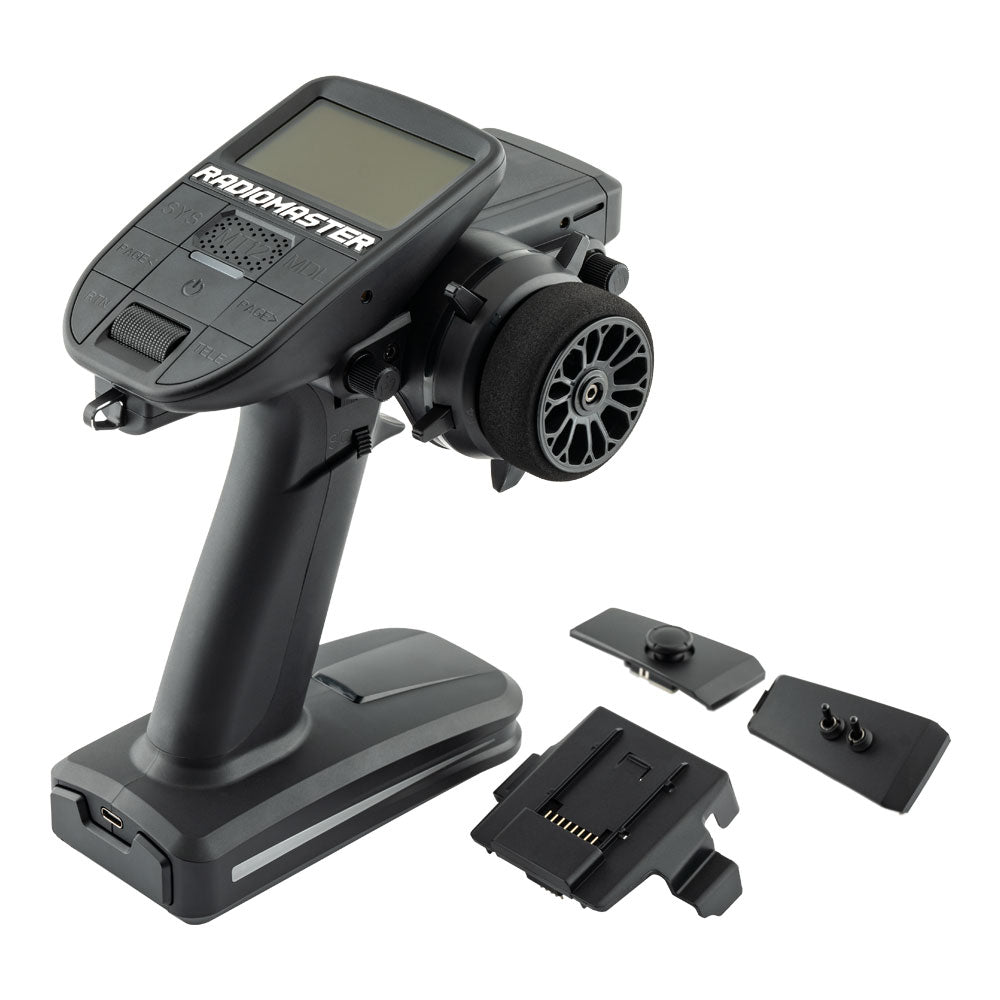
Hero photograph: RadioMaster. Shown as one example from this guide.
THE COMPARISON
10 radios
Surface and aircraft choices for different RC setups.
FIRST CHECK
Receiver match
Protocol and usable outputs matter more than a big channel number.
BEST UPGRADE
Better control
Pick a layout that feels comfortable in your hands.
The RC numbers, without the sales patter
| RC equipment | Worth considering for | Key specification |
|---|---|---|
| RadioMaster MT12 | RC builders who enjoy customising | 16 channels as standard; EdgeTX; ELRS or 4-in-1; USB-C charging |
| Flysky Noble NB4+ | RC car and boat drivers wanting a touchscreen | 8 channels; AFHDS 3; 3.5-inch IPS touchscreen; USB-C |
| Futaba 4PM Plus | RC club racers who prefer physical controls | 4 channels; 40-model memory; T-FHSS/SR and S-FHSS options |
| Futaba 10PXR | RC racers and elaborate surface builds | Up to 10 channels using S.BUS2; F-4G; 4.3-inch touchscreen |
| Spektrum iXSR+ | RC drivers already using Spektrum equipment | 12-channel capability; DSMR+ and SLT support; 4.5-inch touchscreen |
| RadioMaster Pocket | RC pilots wanting a compact first programmable radio | Up to 16 channels; EdgeTX; 288g; ELRS or CC2500 versions |
| RadioMaster Boxer | RC pilots who want full-size gimbals without a huge case | Up to 16 channels; EdgeTX; full-size Hall gimbals; JR module bay |
| RadioMaster GX12 | RC pilots building an ExpressLRS setup | Up to 16 channels; dual-band ExpressLRS; OLED screen; folding sticks |
| RadioMaster TX16S MK3 MAX | RC pilots who want a large programming screen | Up to 16 channels; 5-inch touchscreen; AG02 Hall gimbals; EdgeTX |
| Spektrum NX8+ | RC aircraft owners using DSMX | 20 channels; DSMX; 3.2-inch colour display; 250-model memory |
1. RadioMaster MT12
The MT12 is for the crawler builder who looked at steering and throttle and thought, “Bit basic. Needs a winch and several more reasons to read a manual.” Its wheel-and-trigger layout brings EdgeTX programming to surface RC, so you can build mixes around the functions your model actually has. That flexibility is the attraction, and learning the menus is part of the bargain. If tinkering with the setup is an enjoyable evening for you, have a look. If you want two controls and absolutely no homework, compare simpler options before buying yourself an unexpected software hobby.
Check before buying: Choose ELRS or 4-in-1 to match your receivers. The supplied receiver has fewer outputs than the transmitter supports; batteries are separate.
2. Flysky Noble NB4+
The Noble NB4+ gives you a colour touchscreen and eight channels in a compact surface radio. Handy when the bundled transmitter starts feeling like it’s answering every question with “no”. There’s room for extra functions and a clear place to organise models, but try the grip, trigger and wheel if you can. Your hand has to use it for the afternoon; the comparison chart doesn’t. An impressive display won’t compensate for a trigger you keep reaching for awkwardly. Choose the interface you’ll actually enjoy using, rather than the one that looks most expensive beside your car.
Check before buying: It uses AFHDS 3. A receiver carrying the Flysky name is not automatically compatible; check its protocol.
3. Futaba 4PM Plus
Not everyone wants another touchscreen. Some of us already spend enough time poking glass and wondering why it hasn’t done anything. The 4PM Plus uses a jog-button interface with adjustable trigger position and four channels, a useful combination for many ordinary surface-racing setups. Model memory helps when one radio serves several cars. Start by setting endpoints properly so the steering servo isn’t straining at the stops. That’s a better first use of the settings than selecting the most exotic-looking response mode and hoping it will transform your next lap into a career opportunity.
Check before buying: SR mode does not support telemetry. Receiver and Mini-Z compatibility depend on the specific system and optional equipment.
4. Futaba 10PXR
The 10PXR is a serious purchase for a setup that can use its capabilities. Four-wheel steering, dual ESCs and tank mixes are proper reasons to investigate it; wanting the most elaborate object in the pits is at least an honest reason, but a different one. Futaba gives you a large touchscreen and extensive control adjustments. Check wheel position, trigger reach and left-handed options against how you hold a radio. The expensive transmitter still needs to fit its operator. For a conventional buggy, decide how much of that extra capability will actually leave the menu.
Check before buying: Maximum channel count depends on the receiver/system configuration. Check UK supply, receiver bundle and transmitter battery requirements.
5. Spektrum iXSR+
Already got Spektrum receivers scattered through the RC collection? The iXSR+ lets you investigate a premium radio without automatically rebuilding that whole arrangement. The Android-powered screen, configurable controls and model memory suit several detailed surface projects. Smart telemetry is interesting where the rest of the setup supports it. Write down the features you’ll use before the screen does all the selling. A crawler with accessories and a racer wanting a lovely trigger have different priorities, and “it has loads of stuff” is an expensive way to postpone choosing yours.
Check before buying: The included SR515 has five channels; using all twelve requires suitable hardware. Verify the exact receiver and telemetry combination.
6. RadioMaster Pocket
The Pocket is a compact radio for pilots whose bag is already losing the argument with their equipment. Removable stick ends and a folding antenna help with packing, while EdgeTX provides programming scope beyond what the little case might suggest. It’s worth a look for suitable aircraft and simulator use if you’re happy learning the software. Try the smaller gimbals first, especially with a pinch grip or larger hands. Portability is great; spending the session holding a radio as though you’re trying not to squash a biscuit is less great.
Check before buying: Two 18650 cells are not included. ELRS and CC2500 versions bind to different receiver families; check your exact aircraft.
7. RadioMaster Boxer
The Boxer puts full-size Hall gimbals in a purposeful layout with a monochrome display. It’s an appealing direction if stick feel matters more to you than a very colourful menu. The external module bay offers flexibility, but check what you actually need before interpreting “future-proof” as permission to buy every module in sight. A familiar radio whose controls fall naturally under your fingers can be a lovely thing. You’re supposed to be watching the model, after all, not conducting a tour of the transmitter’s front panel halfway through a flight.
Check before buying: Internal RF choices differ. Check the regional version, compatible receiver and battery package before ordering.
8. RadioMaster GX12
The GX12 will interest pilots who enjoy thinking about the radio link as well as the airframe. Dual-band ExpressLRS, folding controls and a compact OLED screen give it a distinct brief. That doesn’t make it the automatic answer for a ready-made aircraft with a different receiver system. Start with your models and the builds you actually intend to finish, not the theoretical fleet living in your saved shopping baskets. With the right compatible arrangement it’s a package to investigate; without that match, impressive hardware can be a very elaborate way of achieving no connection.
Check before buying: Dual-band benefits require a compatible receiver and configuration. Use the region-appropriate version and settings supplied for your market.
9. RadioMaster TX16S MK3 MAX
The TX16S MK3 MAX offers a five-inch touchscreen, plenty of controls and premium aluminium Hall gimbals. It makes sense to investigate for complicated aircraft projects where programming space and clear controls have a job to do. RadioMaster lists 864g before the battery, so consider the strap and how you carry it too. A large screen is useful; discovering you’ve bought a small exercise programme with a radio attached is worth avoiding. This is the MK3 MAX specifically. A familiar TX16S name does not turn an older version’s specification into this one.
Check before buying: This is the MK3 MAX, not the older MKII. Check receiver compatibility and budget for the separately supplied battery.
10. Spektrum NX8+
The NX8+ naming department has left us something to discuss: the current specification is twenty channels. Check SPMR8210A rather than inferring the equipment from the number in the name. It’s particularly relevant if you already use DSMX, with roller-wheel navigation and aircraft templates offering a different approach from EdgeTX. Compatible forward programming and Smart equipment can add useful functions. Ask your instructor about training arrangements before buying. A radio that works neatly with the person teaching you is worth more than a feature you proudly own and never switch on.
Check before buying: Use the current SPMR8210A listing. Twenty transmitter channels do not create twenty physical outputs on a smaller receiver.
Which RC radio fits your actual hobby?
Start with the receiver protocol, the number of functions you need and a budget that includes receivers and batteries. Two channels cover steering and throttle on many RC cars, but a crawler with extra functions needs more. For RC aircraft, choose a stick layout and discuss training compatibility with your club. Hold a radio before buying whenever possible. Trigger reach, switch positions and balance are difficult to judge from photographs.
Will it fix your RC driving? Steady on.
Response modes can matter to experienced racers, but they are only one part of the chain. The receiver, servo and supported mode all need to match. For most first upgrades, reliable endpoints, a comfortable grip and understandable settings are more immediately useful. Set up one model carefully, check its failsafe according to the manuals, and save a backup before experimenting. Familiar controls help you concentrate on the model.
One RC radio for the whole collection?
Sometimes, with the right receivers and modules. Multi-protocol does not mean universal, and surface and aircraft systems are not automatically interchangeable. Check the exact protocol and firmware combination rather than relying on a brand name. RadioMaster provides a useful starting point in its official manuals library. A little compatibility homework now can save replacing several receivers later.
Still happily browsing RC kit?
Compare these choices with the RCnews car buying guides, browse RC Insights or find a UK RC club where you can ask what works in the models you actually use.
The five-minute radio audition
If a shop or club can let you hold a radio, try the actions you’ll repeat. Reach the trigger naturally. Move the wheel through its travel. Find a switch without looking down. With a stick radio, check your grip and whether the case feels balanced. You’re buying a tool for your hands, not a tiny television with aspirations.
Then think about the models. Make a list of functions, not just channels: steering, throttle, winch, lights or whatever your project needs. Check how those functions can be assigned and what the receiver physically provides. A big transmitter channel count cannot conjure extra sockets on a small receiver. If only upgrades were that obliging.
Name the models like you’ll have to recognise them
A clear model memory name beats “car 3 final new” when you’re about to switch on. Follow the manuals for binding, failsafe and direction checks, and confirm the selected model before use. A transmitter can remember a lot; you still need to choose the correct entry.
Back up a working setup before experimenting. Change one thing, note what it does and keep a route back. Otherwise the evening ends with you insisting it worked before while the menu stares back, entirely unmoved by your case.
Spend where the annoyance actually is
If the current radio hurts your hand, prioritise ergonomics. If you keep running out of functions, check channels and outputs. If settings are a pain to find, try the interface. Those are real upgrades, and they’ll still be useful after the new-radio excitement settles down.
If the real problem is arriving at a corner much too quickly, the transmitter may be innocent. Give the existing setup a fair check before buying a different box to hold while repeating the same mistake. Better controls help you concentrate. They don’t perform a quiet software update on your thumbs.
That’s the choice we’d make: the radio that fits your equipment and feels right in use. Whether it has a flashy display, physical controls or an enormous programming menu is secondary to whether you can do the job comfortably. Buy for the sessions you want to have, and leave enough time to learn the thing. There’s plenty of fun in RC without having an argument with your transmitter every weekend.